

Skip to content
Linkedin Facebook Instagram Youtube
  • Login
    • myMIP
    • myDashboards
  • Login
    • myMIP
    • myDashboards
Book a demo
Contact
  • Home
  • Services
  • MIP Platform

    Features

    MIP Master Intelligence Platform
    Target Customer Engagement Module
    Socials Social Media Module
    Insights Intelligence, AI & dashboards
    Data Quality
    Customer Engagement

    What's new

    Latest Releases

    Sectors

    Retail, Ecomm
    Not for Profit, Fundraising, Charity
    Sports & Leisure
    B2B
    FMCG, Food, Hospitality

    Master INtelligence Platform

  • Inspiration
    • Blog
    • Events
  • Jobs
  • Support
    • myMIP
  • EN
    • NL
    • FR
  • EN
    • NL
    • FR

Contacts module

24
  • Contact
    • Giving company bankruptcy status
    • Create contact
    • Add or remove contact from test list
    • Contact search
    • GDPR | Histo of a contact lookup
    • GDPR | Looking up permissions and communications from/with a contact
    • Give individual status deceased
    • Add postretour manually
    • Giving relationship status 'Right To be Forgotten'
    • View survey results
    • Tabs contacts module not available
    • Set touchpoint to invalid
    • Add Touchpoint
    • Indicate preferred touchpoint
  • Permissions
    • Add Permission
    • Permissions overview
  • Attributes
    • Add attribute
    • Remove Attribute
  • Interactions
    • Add interaction
    • Interactions overview and details
    • View survey results
  • Notes
    • Add note
  • Unique ID
    • Consult/manage unique IDs.
  • Bank details
    • Add bank account number

Module Target

11
  • Target introduction
  • Audiences
    • Customize an audience
    • Creating a new audience
  • Engager
    • Setting up a new action
    • Synchronize selection to external tool
    • Export selection to SFTP
    • Add test list to selection
  • Templates
    • Activation email domain & sender
  • Media Library
    • Adding files to the media library
    • Deleting files from the media library
  • Flow Automation
    • Stratics webforms introduction

Socials module

2
  • Making socials connection
  • Socials introduction

Module Insights

1
  • Activate and consult myMIP dashboards

Data Quality module

4
  • Data quality | Offering services
  • De-duplication | Offering services
  • De-duplication | Merge contacts manually
  • De-duplication | Overview of activated services

Module Uploads

5
  • 1. Introduction
  • 2. Overview
  • 3. ERROR - Global
  • 4. ERROR - RECORD
  • 5. Import Contacts

Module Settings

7
  • User | Customize MyMip language
  • User | Activate two-factor authentication MyMip
  • User | Logout
  • User Management
  • Meta | Activate connection
  • Meta | Deactivate connection
  • Managing test lists

GDPR

3
  • GDPR | Histo of a contact lookup
  • GDPR | Looking up permissions and communications from/with a contact
  • GDPR retention periods & right to be forgotten
View categories
  • Home
  • Support
  • myMIP
  • Module Target
  • Templates
  • Activation email domain & sender

Activation email domain & sender

William Moehlig
Updated 04/09/2024

1 min reading time

To use the built-in mail module in MyMip, you will need to configure a sender. The first step for this is to activate an email domain with our partner Copernica. After that you will have to set up some things in your domain so it can be used to send out marketing emails.

All this configuration also contributes to your emails being considered legitimate in outlook, gmail, ...

Roadmap #

  1. Contact your contact at Stratics and provide your email domain (bv.@example.com)
  2. Stratics sets up your domain & links back with the DNS & forwarding configuration you need to set up
  3. Add sender in settings
  4. Now it is possible to sign up your customers with this email address. Congratulations!

Email domain (Copernica) #

Validation #

Validation can be obtained by creating a TXT record. You will receive the correct record name & value from a Stratics employee
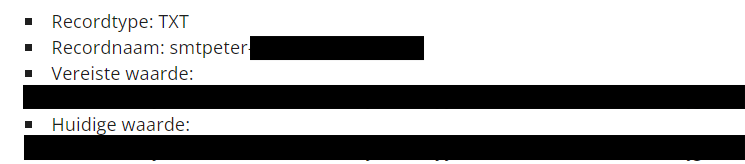
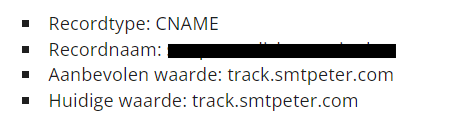
Tracking #

Tracking requires a subdomain to be configured. This subdomain points to our mail solution servers to record clicks and opens there.
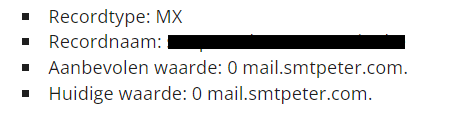
Bounces #

This configuration is necessary to automatically forward bounces so that they are properly processed by our solution and the GDPR is respected
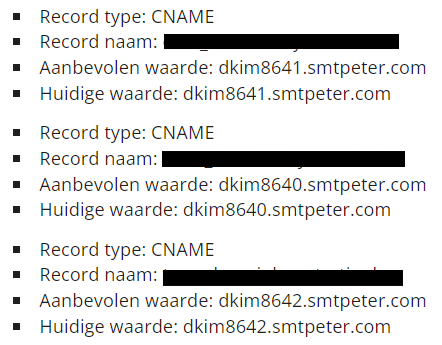
DKIM #

This is needed to send an invisible digital signature along with which recipients can validate the sender address
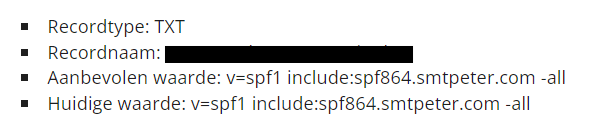
SPF #

This record gives Copernica the rights to send emails with your sender address.
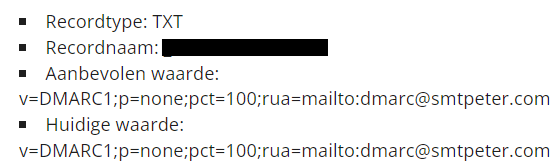
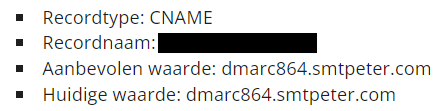
DMARC #

This asks the recipient to handle emails that cannot be validated. This is needed to provide delivery statistics.
CAA / HTTPS #

This is automatically provided by Let's Encrypt. If you have blocked this authority you will need to provide an https certificate (including the private key)

Configure Sender (MyMip) #

Overview of sender addresses #

You can go to the overview of sender addresses by using the following navigation:

  1. Settings
  2. Email

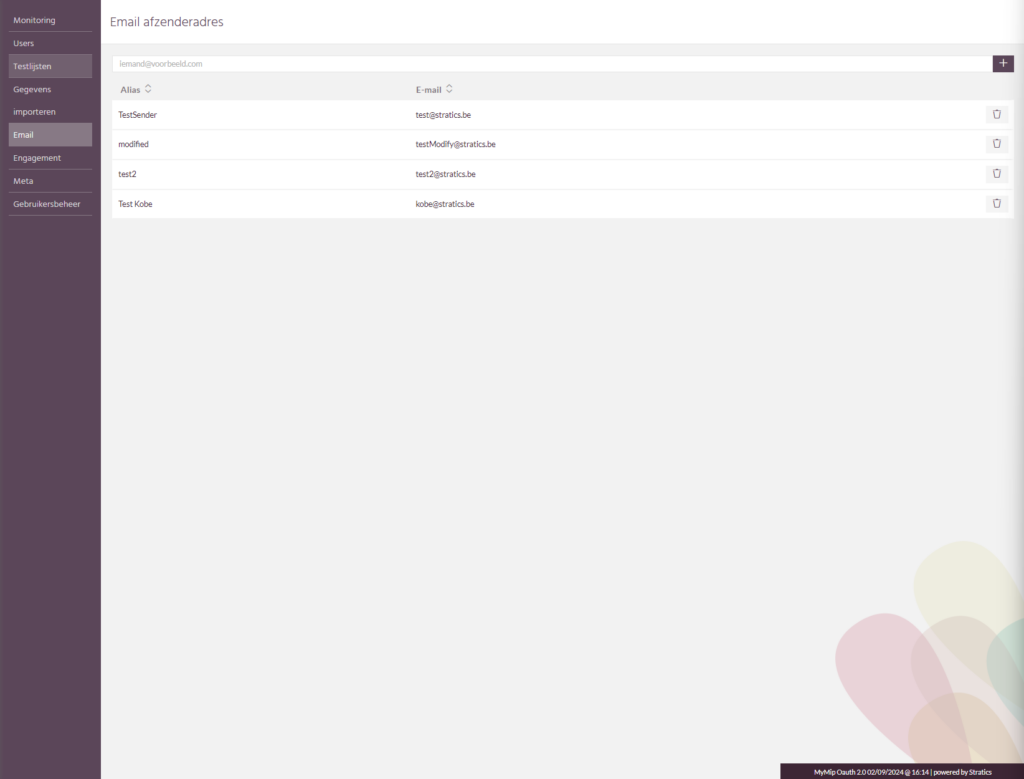
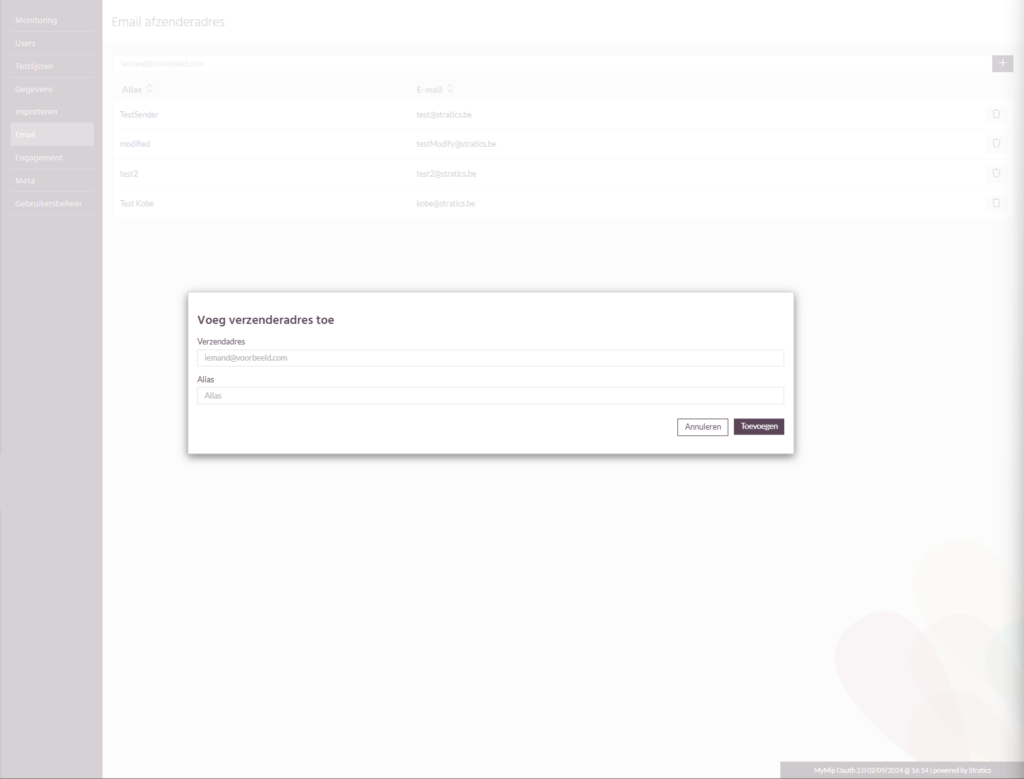
This will take you to a page with the overview of your set sender addresses. If you press the plus sign here you can add a new address that you want to send mail to.
Creating sender address #

This consists of both an e-mail address and an alias. This alias is the name the recipient will see in his e-mail client.

Attention, do not use personal email addresses here! We recommend setting general addresses here such as marketing@example.com
Control #

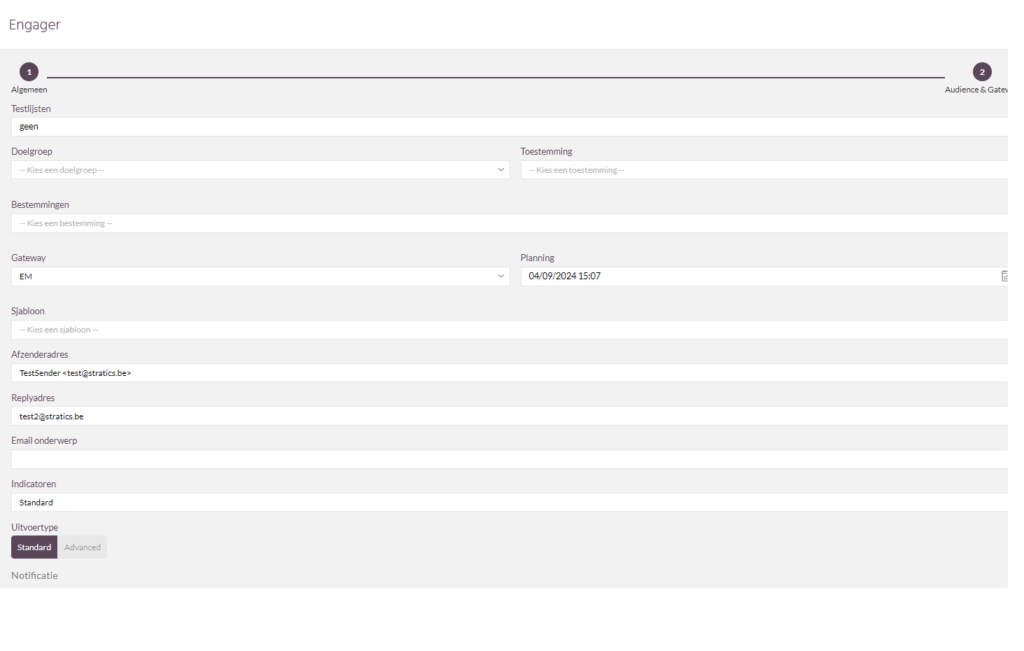
Now that a sender is set you can use it in the engager for the EM gateway. Congratulations for setting this up. It is recommended that you try this with a test list first before using this address to send out a bulk mailing.
email
Activation email domain & senderActivation email domain & sender

Made possible by BetterDocs

Contents
  • Roadmap
  • Email domain (Copernica)
    • Validation
    • Tracking
    • Bounces
    • DKIM
    • SPF
    • DMARC
    • CAA / HTTPS
  • Configure sender (MyMip)
    • Overview of sender addresses
    • Creation of sender address
    • Check

Was this helpful?

  • Happy
  • Normal
  • Sad
let's talk

Your inspiring data & AI journey starts now!

Schedule a call today and find out how Stratics can enhance your marketing.

Schedule a discovery call
Schedule a MIP Demo

Stratics

We are a Belgian company and offer advanced marketing , data and AI solutions.

The Master Intelligence Platform (MIP) combines CRM, CDP, marketing automation, AI and social media.

With expertise in growth hacking, performance marketing and AI, we drive your growth.

Contact Info

Kontichsesteenweg 38A
2630 Aartselaar
Belgium
info@stratics.be

© 2026 Stratics. All Rights Reserved.
Facebook f X-twitter Linkedin-in Instagram Youtube