Objective: Create a lookalike audience in Meta based on a Custom Audience exported from MIP.
Terms
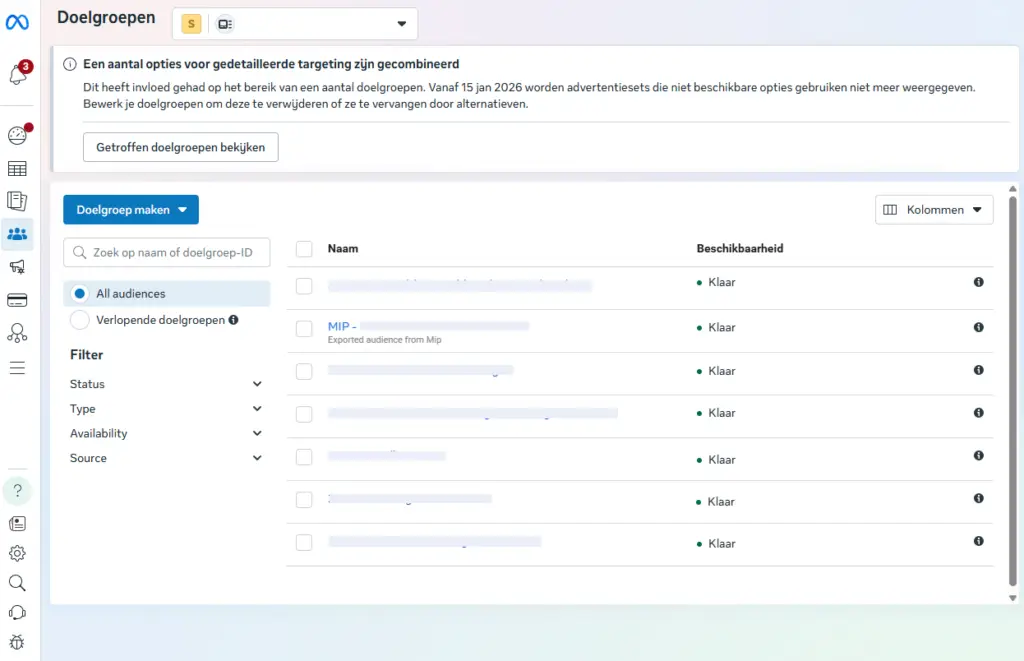
- MIP exports are visible in Meta Ads Manager → Audiences.
- The target group status is Ready.
- Ideally, the source list should contain at least 100 people.
Steps #
1) Open the appropriate target group #
- Go to Meta Ads Manager (https://adsmanager.facebook.com/adsmanager/audiences?)
- Open Audiences
- Find and select the MIP target group (e.g., MIP – …)
2) Create a lookalike (similar target group) #
- Click on Actions in the top right corner.
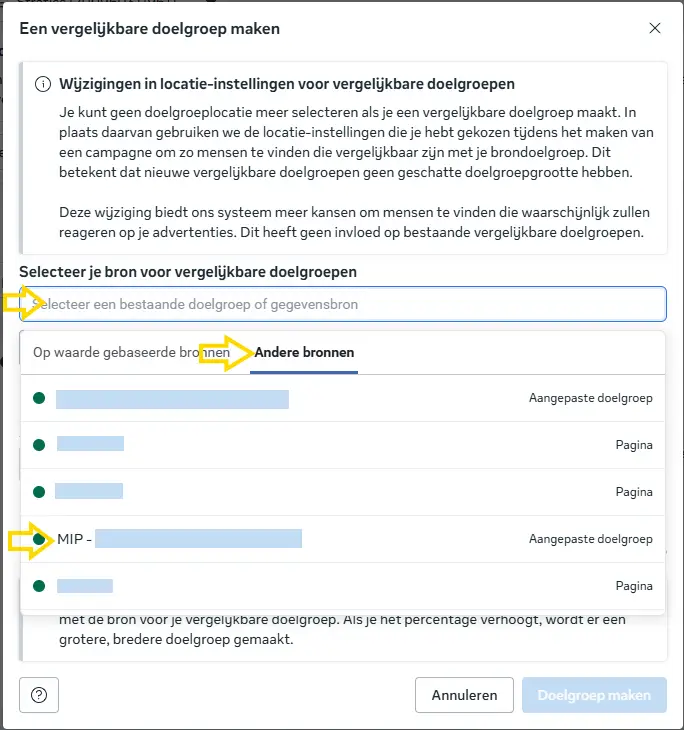
- Select Create lookalike audience
3) Set the lookalike in #
- Source: select the selected MIP target group ("other sources")
- Size / percentage:
- Start with 1% (most comparable)
- Optional: create additional variants of 2% and 5% for upscaling.
4) Create the target group #
- Click on Create Target Group
- Wait until the status is Ready (may take several minutes to up to 24 hours).
Best practice (recommended) #
- Create separate lookalikes per percentage (e.g., LAL 1%, LAL 2%, LAL 5%) for greater control and better testing.
- Use the lookalike in campaigns via Ad set → Audience → Custom audiences.