How do I add a touchpoint through MyMip? #
You want to add a new touchpoint (email address, postal address, mobile number...) to a contact. Follow the steps below to do this.
Contact Search #
Log into MyMip.
Search for the contact using the search field at the top of the page or the search option in the contacts module. See also Search for contact.
Add Touchpoint #
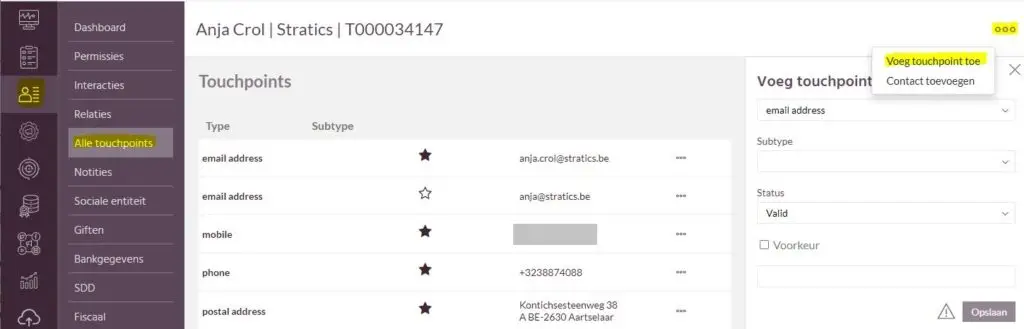
Under the contacts module, navigate to the "All Touchpoints" tab.
- If necessary, check if the touchpoint was not added anyway.
Right click on the 3 dots and choose "Add touchpoint.
- Complete the necessary data:
- Specify the type of touchpoint (e.g., e-mail address).
- Complete a subtype if necessary
- The Status defaults to valid.
- Indicates whether or not it is the preferred touchpoint (e.g., if multiple e-mail addresses are available).
- Enter the touchpoint.
Then click on "Save.
- The new touchpoint appears in the list of touchpoints.